
 Infor LN Implementation
 Infor LN Migration
 About us
 Contact
Why documents aren't where you need them
Many companies are familiar with this everyday scenario: The invoice has been saved, but no one can immediately recall where. The contract is in the DMS, the transaction is in the ERP system, and the attachments are in the email inbox.
Operational issues | Impact on processes |
Documents have been filed but are not directly linked to the business transaction | Time spent searching instead of productivity |
Different versions are circulating at the same time | Unnecessary need for coordination |
Paper and digital filing coexist | Delayed approvals |
The problem is usually not that documents are missing, but that they aren't available when needed.
This is exactly where Infor IDM comes in.
Documents are directly linked to the relevant task and are visible right where the work is being done.
When is IDM particularly worthwhile?
IDM is particularly useful when
- You need to replace legacy systems such as DocuWare or easy archiv
- Documents are currently stored across multiple systems
- Inspections and audits are time-consuming
- Paper-based archives still exist
- Output processes are not automated
More Than Just Storage: How Infor IDM Manages Documents in a Structured Way
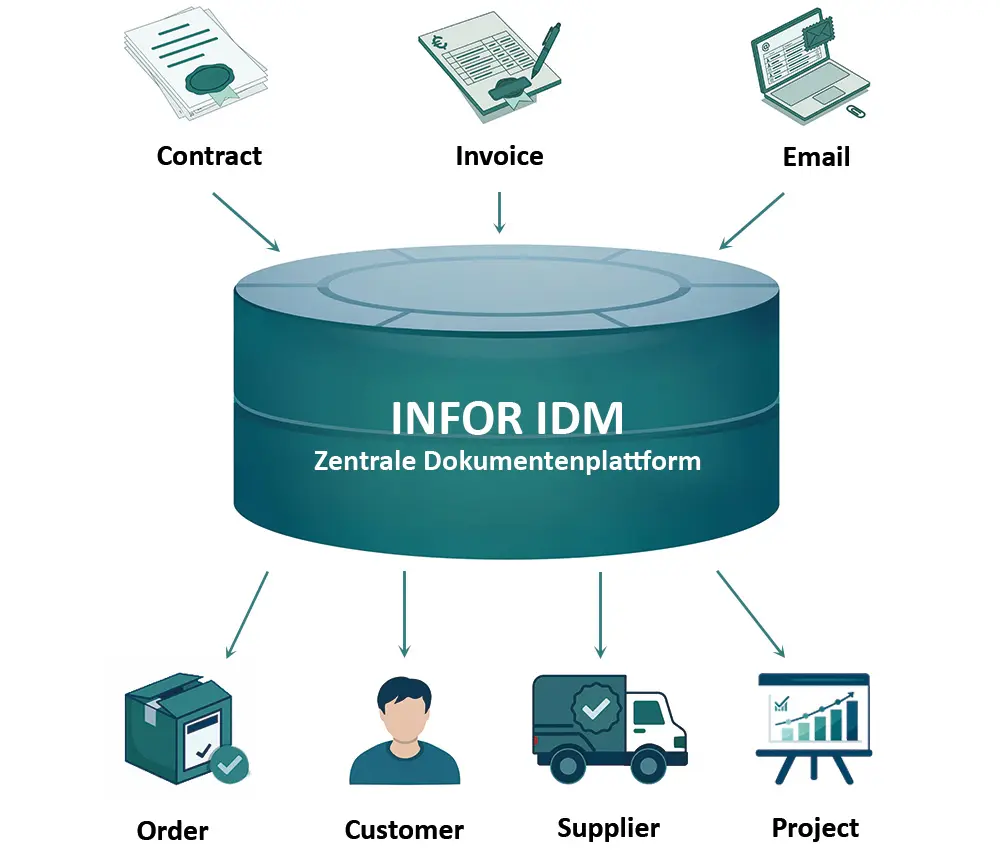
Infor IDM is not merely a storage system. It manages the entire lifecycle of a document: from the initial upload to rule-based archiving or deletion.
Documents are not stored in isolation, but are directly linked to the relevant business objects in Infor LN—such as purchase orders, invoices, projects, or customers.
This ensures that information is available exactly where it is needed: in the right context, at the right time, and for the right people.
This fundamentally changes the way we work:
- You no longer have to search for documents
- Versions are clearly traceable
- Information is an integral part of the process—not organized separately from it
Infor IDM thus establishes a seamless connection between documents, processes, and decisions.

Context Instead of Search

Clear versions
![[Translate to English:] Icon Revisionssicherheit](/fileadmin/Software_ERP/erp-system-cloud/icons/icon_revisionssicherheit.svg "[Translate to English:] Revisionssicherheit")
Audit compliance
![[Translate to English:] Prozesssicherheit](/fileadmin/Software_ERP/erp-system-cloud/icons/icon_prozesssicherheit.svg "[Translate to English:] Icon Prozesse")
Process integration
The Document Lifecycle in IDM
Documents can be automatically generated from ERP processes, manually uploaded, imported via Microsoft Outlook, created using the Word add-in, captured via scanning clients such as DocSys or Ephesoft, or classified using OCR-based capture solutions.
IDM saves documents:
- Cloud-based or on-premises
- Versioned
- With role-based access controls
- With full version history
A key consideration for many companies: audit-compliant archiving without a parallel paper archive.
The Related Information Widget displays documents right next to the business object: order, invoice, customer, supplier, project.
The ERP system does not need to know any details about the document—IDM links them based on shared attributes.
IDM supports:
- Routing
- Approvals
- Status Tracking
- Versioning
- Change Log
When used in conjunction with Infor ION, workflows can be managed across multiple products.
A key component is document output management.
This is where control takes place:
Should the document be sent via email?
Should it be archived automatically?
Should it be printed via Enterprise Print?
Is a Word template being used?
Will it be transferred to third-party systems?
The Microsoft Word add-in allows you to create templates that automatically integrate ERP data. Enterprise Print enables cloud-based printing at registered locations.
When legacy document management systems reach their limits
In the context of cloud migrations, IDM is often used to replace legacy systems such as DocuWare or easy archiv when existing solutions no longer align with the target architecture or operate separately from ERP processes.
Typical scenarios:
- Document migration from DocuWare or easy archiv
- Redefinition of document types
- Streamlining of legacy structures
- Implementation of audit-compliant archiving
- Establishment of modern output processes
What may initially sound like a simple system replacement is often a sensible fresh start. That’s because switching to Infor IDM offers the opportunity not just to migrate your document management system, but to improve its structure.
FAQ: Frequently Asked Questions About Infor IDM
The biggest difference is the context: documents are directly linked to the transaction. For example, an invoice is immediately visible next to the order. This saves time spent searching, reduces the need for follow-up questions, and ensures that decisions can be made more quickly.
The technical aspects of the import are usually fairly straightforward. The real challenge lies in the structure:
- What document types are needed?
- Which legacy data is still relevant?
This is where the decision is made: whether to simply migrate the data or to take the opportunity to truly improve the filing system.
In IDM, the traditional folder-based system is replaced by document types and metadata.
This means fewer questions like “Where is this stored?” and more like “Which process does this belong to?”.
In practice, this is a change, but it brings significantly more clarity.
IDM already includes versioning, version history, and access controls.
Proper configuration is key:
Retention periods, permissions, and deletion rules must be clearly defined.
Only then will the system meet audit requirements.
We will be happy to present solutions for your industry and your processes. Talk to the specialists for SMEs.
request now